Since my Angular and OpenID Connect series from 2018, the security best practices have evolved a bit. When I wrote that series, OAuth 2.0 Authorization Code flow with PKCE was considered the best practice over the previous Implicit flow commonly used in Angular apps.
Now, the security best practices have evolved again, as we see common use of server-side components such as Next.js/AnalogJS and BFFs to absorb some of the complexity and performance needs of Angular apps, as well as provide enhanced security by acting as our auth client, as we will see in this post.
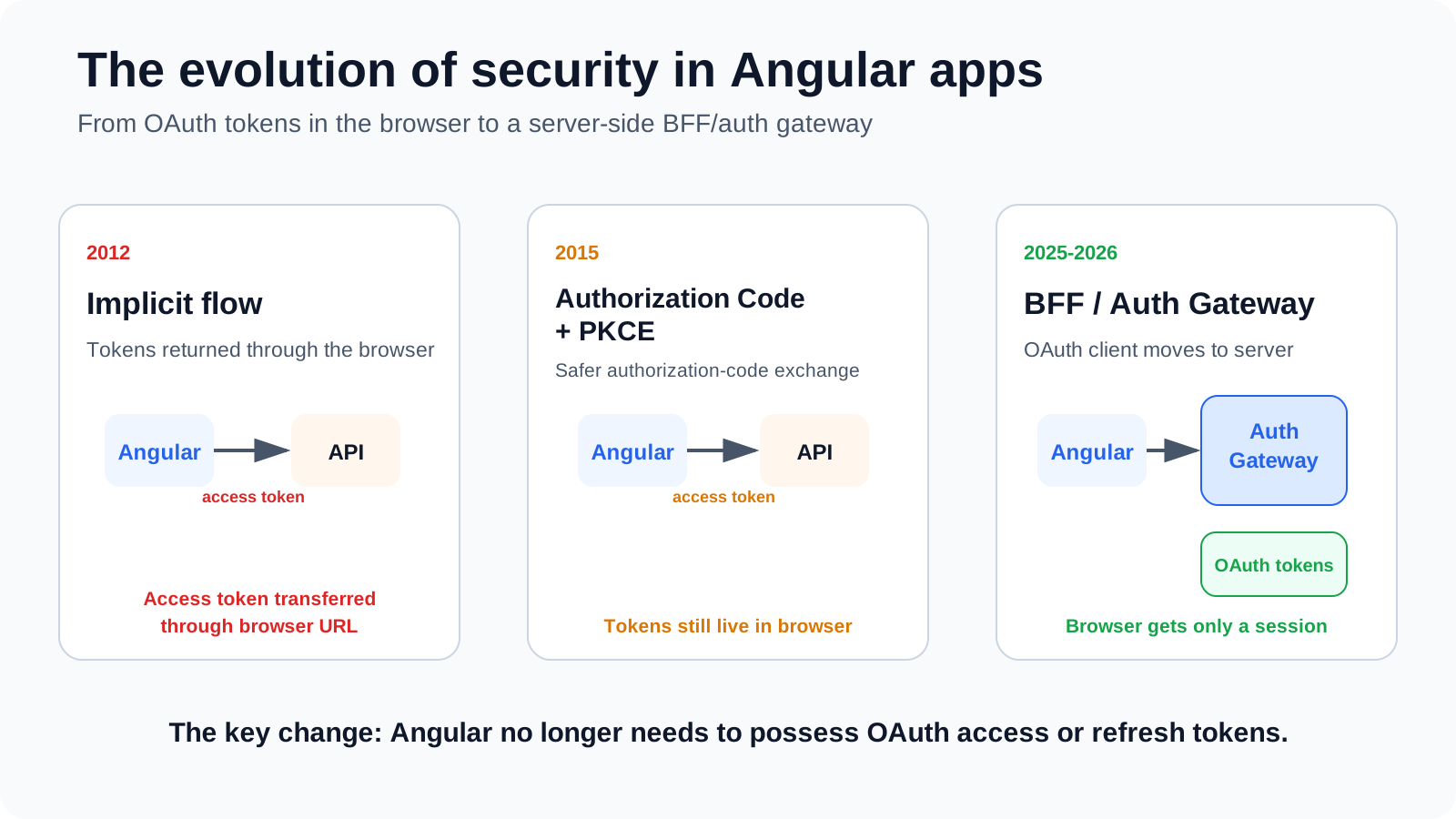
This post will take you through the journey of frontend security over the latest decades (I am getting old), from OAuth 1.0 to OAuth 2.0 and the latest browser security best practices.
I have also added a new Solution 7 – Modern Angular Auth Gateway (Nx) to the original GitHub repository so you can see the updated code implementation of the solution as well.
TLDR
My recommendations regarding security best practices in Angular apps have gone from the pragmatic Implicit flow to utilizing server-side security using an auth gateway as the auth client for Angular apps. This works well with systems consisting of multiple microfrontends, as the auth gateway serves as the auth client for all of them.
This is also the direction of the current IETF browser guidance. RFC 10017 presents the BFF, token-mediating backend and browser OAuth client patterns in decreasing order of security and strongly recommends the BFF pattern for business and sensitive applications.
That said, Angular auth clients using Code flow + PKCE are still one of the most common authentication setups for Angular apps and are not suddenly invalid. It just means that if you are not moving the auth client to a server-side component, you are exposing your apps to an entire class of token-theft problems that you need to mitigate.
Before OAuth 2.0: cookies and server-side sessions
Before talking about SPAs, it is useful to remember that putting authentication state on the server is not a new idea at all.
Traditional web applications usually authenticated the user on the server and kept a server-side session. The browser carried a session identifier in a cookie. Cookies were used long before the current cookie specification, with the cookie model standardized in RFC 6265 in 2011.
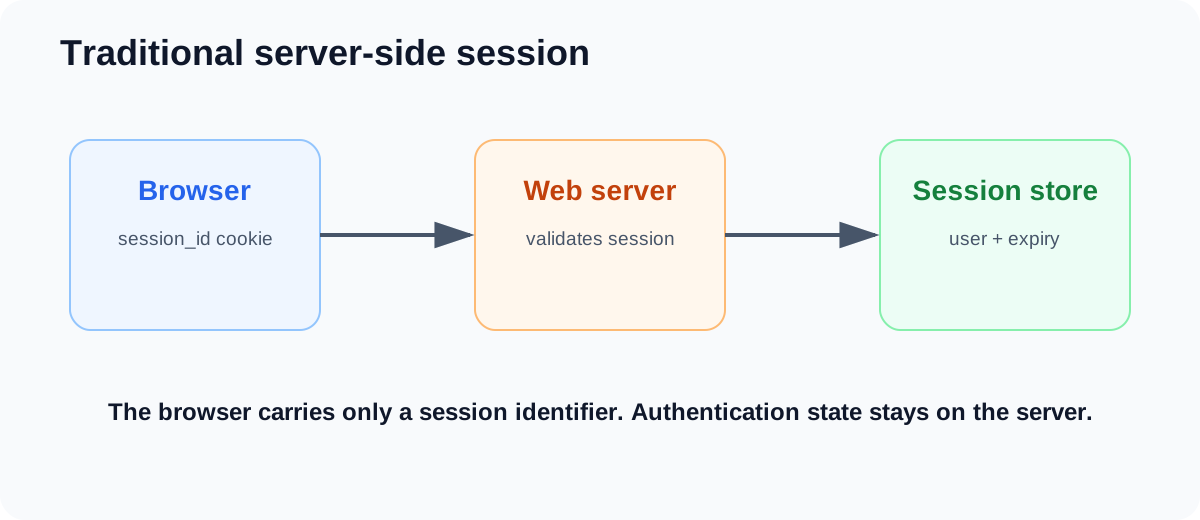
This works very well when the browser is talking to one application. What it does not solve is delegated authorization: how does one application call another API on behalf of the user without getting the user’s password?
2010: OAuth 1.0 and signed requests
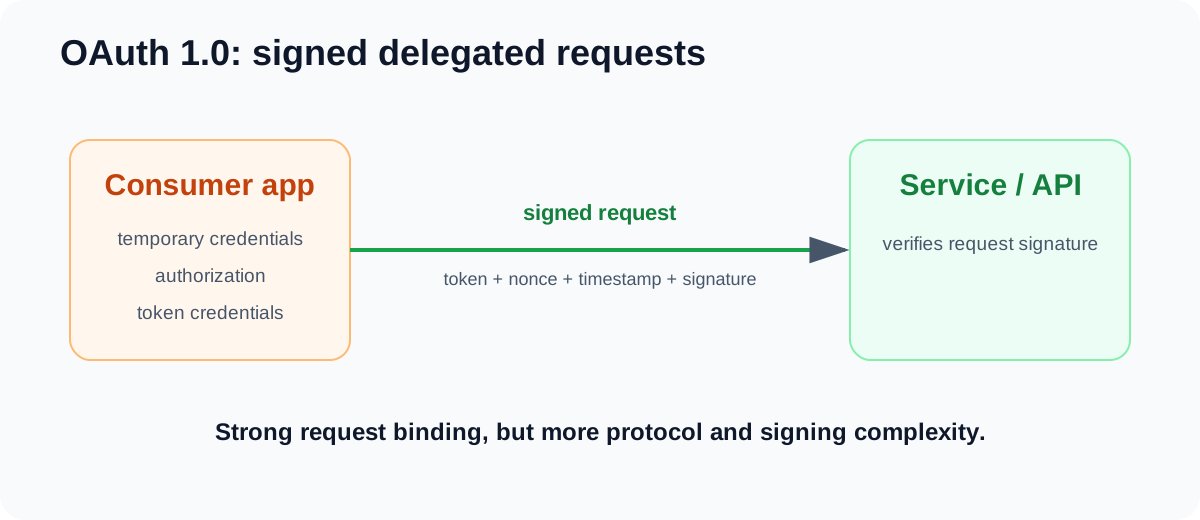
OAuth 1.0 (RFC 5849), standardized in 2010, addressed delegated authorization without requiring the user to hand a third-party client their username and password.
The protocol used temporary credentials during authorization, exchanged those for token credentials, and then authenticated protected-resource requests with signatures based on the token, client credentials, nonce, timestamp and request details. That gave strong request binding, but the signing model and credential handling were relatively complex to implement.
2012: OAuth 2.0 simplifies delegated authorization
RFC 6749 – The OAuth 2.0 Authorization Framework was published in 2012. OAuth 2.0 was not wire-compatible with OAuth 1.0; it deliberately changed the model.
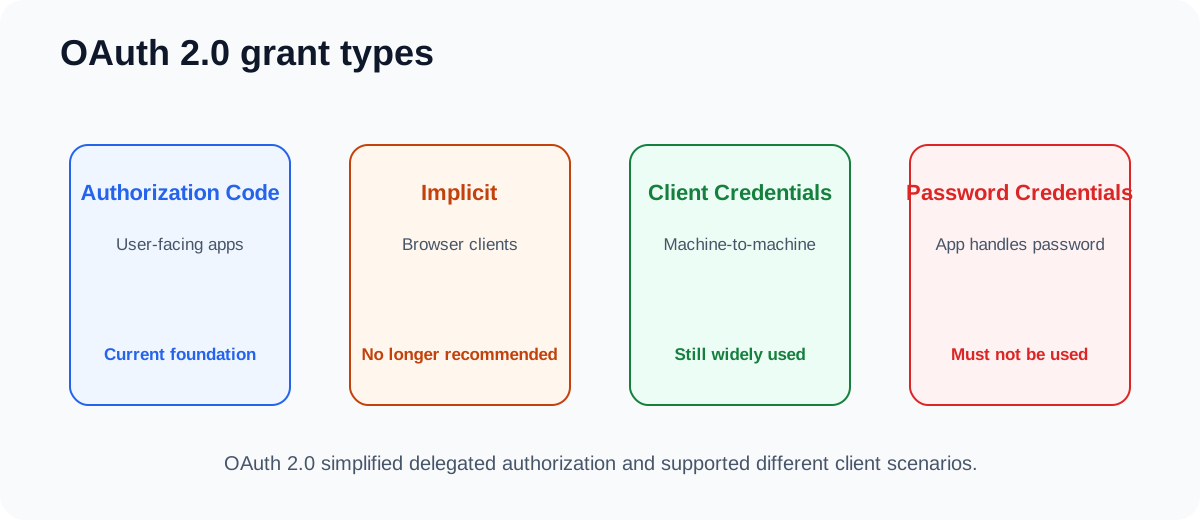
The big simplification was moving away from signing every protected-resource request and toward bearer access tokens protected by TLS. RFC 6749 also defined different grant types for different client scenarios:
- Authorization Code for user-facing clients that can exchange a short-lived code for tokens.
- Implicit for browser-based clients that received the access token directly in the authorization response.
- Client Credentials for machine-to-machine access where the client itself is the resource owner or acts on its own behalf.
- Resource Owner Password Credentials where the client directly handled the user’s username and password. Modern OAuth guidance now says this grant MUST NOT be used.
OAuth 2.0 was designed as an extensible framework, so additional grants such as Device Authorization were added later.
2012: OAuth 2.0 and the implicit-flow era
For early browser applications, Implicit solved a real platform limitation. A JavaScript application could receive data in a redirect, but cross-origin calls to an authorization server’s token endpoint were not as generally available as they are today. The Implicit grant therefore returned the access token in the front-channel authorization response.
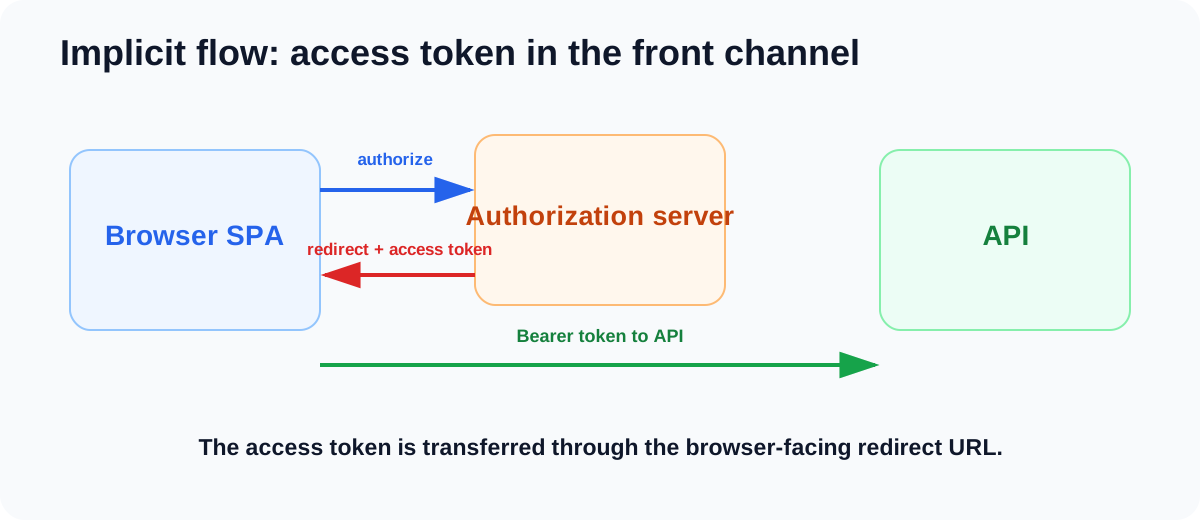
The current browser BCP, RFC 10017, explicitly explains that the widespread adoption of CORS later made it practical for browser clients to call the token endpoint and use Authorization Code flow instead.
The browser also exposes a large JavaScript attack surface. XSS, compromised third-party scripts or dependencies, malicious extensions and other code executing in the application’s origin can act with the application’s privileges. If that code can read a bearer token, it can potentially copy the credential and use it outside the browser.
This is one of the reasons the Implicit flow aged badly. RFC 9700 documents the leakage and replay risks of access tokens issued in the authorization response, while RFC 10017 now states:
“Browser-based clients MUST use the Authorization Code grant type and MUST NOT use the Implicit grant type.”
RFC 10017
2015: PKCE protects the authorization code
RFC 7636 – Proof Key for Code Exchange by OAuth Public Clients was published in 2015.
PKCE was created for a very specific problem: the authorization-code interception attack.
With normal Authorization Code flow, an attacker that manages to intercept an authorization code could try to redeem that code at the token endpoint. PKCE binds the authorization request and token request together using a per-login secret:
- The client generates a cryptographically random
code_verifier. - It derives an S256
code_challengeand sends that in the authorization request. - The authorization server returns an authorization code.
- The client must present the original
code_verifierwhen redeeming that code. - The authorization server verifies that the verifier matches the challenge from the original request.
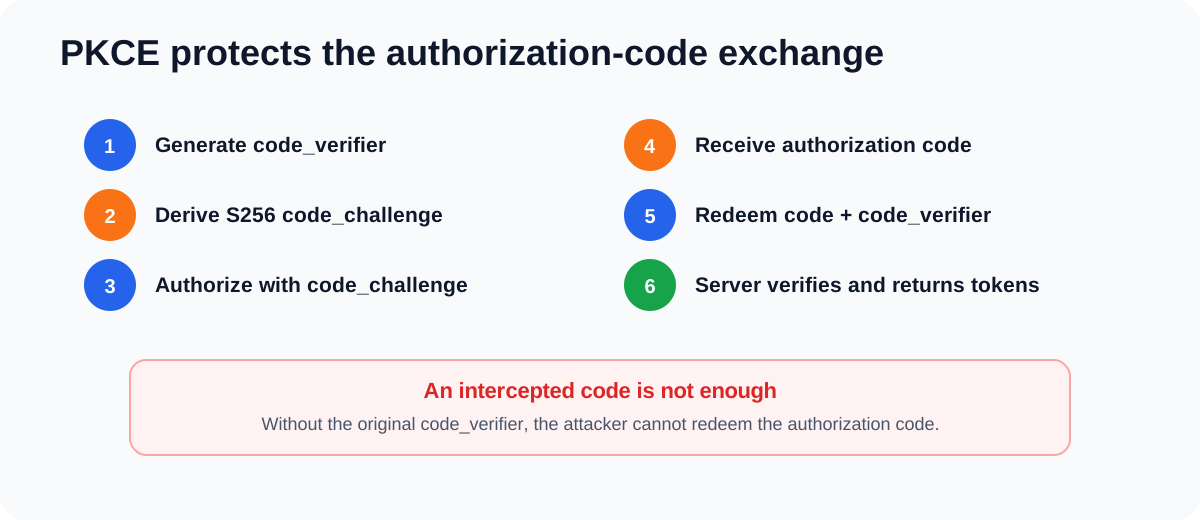
This distinction matters because Code flow and PKCE fix different things. Authorization Code flow keeps the access token out of the front-channel redirect. PKCE protects the authorization code from being successfully redeemed by the wrong client instance.
RFC 7636 says clients capable of using S256 must use it. RFC 8252 then made PKCE mandatory for public native applications in 2017.
For browser apps, the guidance was also already moving in this direction when I wrote my Angular series. The November 2018 OAuth 2.0 for Browser-Based Apps Internet-Draft described Authorization Code + PKCE as browser best practice and said public browser apps must implement PKCE. It was still an Internet-Draft rather than a final RFC, but it shows where the browser guidance was heading at the time.
That is why the historical timeline of my posts should not be read as “2018 Implicit, 2019 PKCE”. My 2018 series already covered Code + PKCE and used it in the Angular implementation. The 2019 follow-up simply zoomed in on why Code + PKCE was preferable to Implicit.
What PKCE does not solve: the token is still in the browser
Code + PKCE is a much better browser OAuth flow, but after the token exchange the access token still ends up in the SPA.
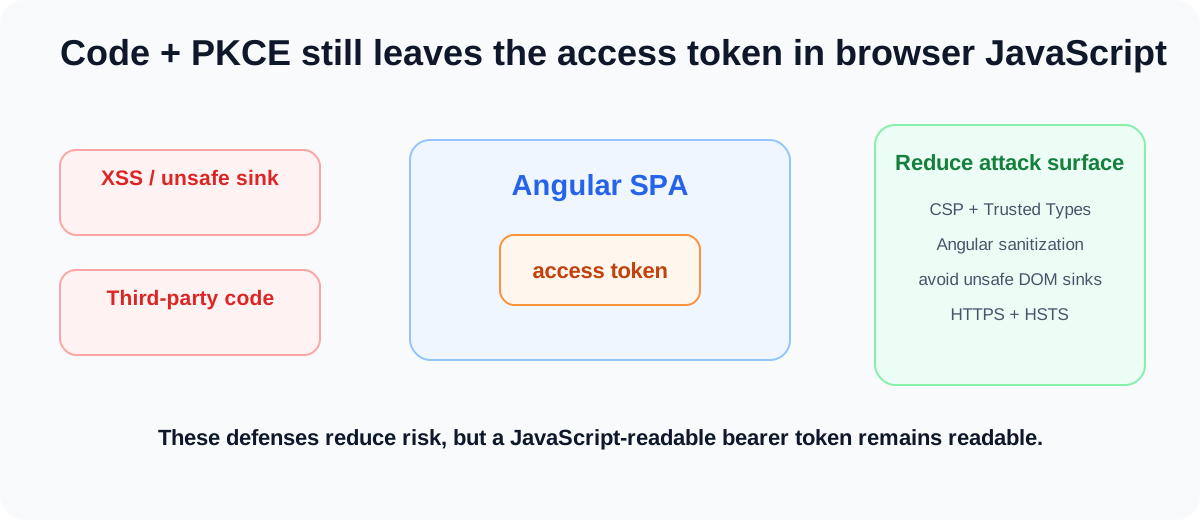
You can choose memory, sessionStorage or localStorage, and those choices change persistence and some attack characteristics. They do not change the fundamental fact that JavaScript that controls the application can use a JavaScript-accessible token.
If you are keeping sensitive data or tokens in a browser application, you still want the normal defense-in-depth controls. I covered these in more detail in The Complete Guide to Angular Security:
- Content Security Policy (CSP) to restrict where executable resources can come from and reduce XSS opportunities.
- Trusted Types where practical to make dangerous DOM sinks explicit.
- Angular’s built-in sanitization and avoiding direct use of dangerous DOM sinks such as uncontrolled
innerHTMLor string-based code execution. - HTTPS + HSTS to protect transport and prevent downgrade/SSL-stripping attacks. HSTS is not an XSS control itself, but it helps prevent an attacker on the network from forcing an insecure transport path and injecting content.
- Careful third-party dependency and script management.
These controls make token theft harder. They still do not make a JavaScript-readable bearer token inaccessible to JavaScript.
This is where the question becomes more interesting than “where should I store the token?”:
Why does Angular need the OAuth token at all?
2025-2026: the browser security boundary moves to the server
Two recent RFCs make the modern direction much clearer.
RFC 9700 – Best Current Practice for OAuth 2.0 Security, published in 2025, updates the general OAuth security guidance. Among other things it requires PKCE for public clients, recommends PKCE for confidential clients, requires exact redirect-URI matching, prohibits open redirectors and says the Resource Owner Password Credentials grant must not be used.
“Public clients MUST use PKCE.”
RFC 9700
RFC 10017 – OAuth 2.0 for Browser-Based Applications, published in 2026, then applies the modern threat model specifically to browser applications.
It describes three main application patterns:
- Backend for Frontend (BFF)
- Token-mediating backend
- Browser-based OAuth client
The RFC explicitly presents them in decreasing order of security. In the BFF pattern, the server handles OAuth responsibilities, associates access and refresh tokens with a browser session, and forwards protected API requests with the appropriate access token.
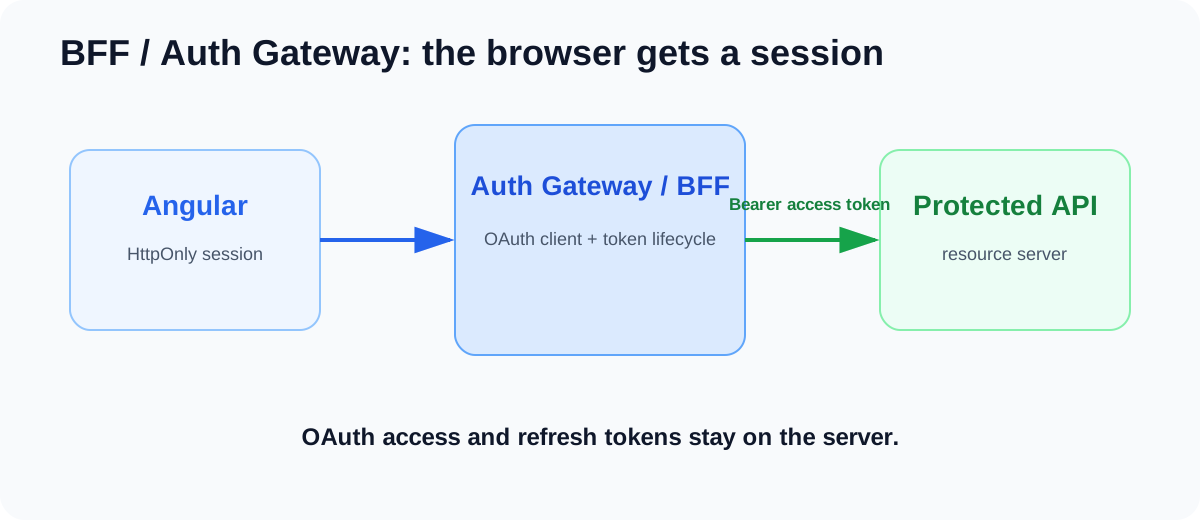
Angular can now make a request such as:
this.http.get<Order[]>('/api/orders');No access-token service in Angular. No interceptor that needs to retrieve a bearer token. No refresh token in browser storage. The gateway translates the browser session into the OAuth credential needed by the API.
This is the key architectural evolution for me:
Expose a session to the browser. Expose OAuth tokens to servers.
The BFF improves XSS resilience, but it does not solve XSS
If malicious JavaScript gets control of your Angular application, moving the OAuth token to the server does not magically make the application safe. The malicious code can still act as the user and send requests through the BFF while it runs in the user’s browser.
What changes is the consequence of that compromise. RFC 10017 explicitly distinguishes client hijacking from token theft: with a BFF there is no access or refresh token in the browser for the attacker to copy and continue using from their own infrastructure.
You still need normal browser security: CSP, Trusted Types where appropriate, output encoding and sanitization, safe DOM usage, dependency hygiene and all the controls that reduce the chance of malicious code executing in the first place.
Cookies mean you need to think about CSRF again
The browser automatically sends cookies, so a BFF must have a proper CSRF defense. RFC 10017 explicitly requires this.
The RFC says the BFF MUST set Secure and HttpOnly on its cookies, SHOULD use SameSite=Strict, SHOULD use Path=/, and SHOULD NOT set a broad Domain attribute.
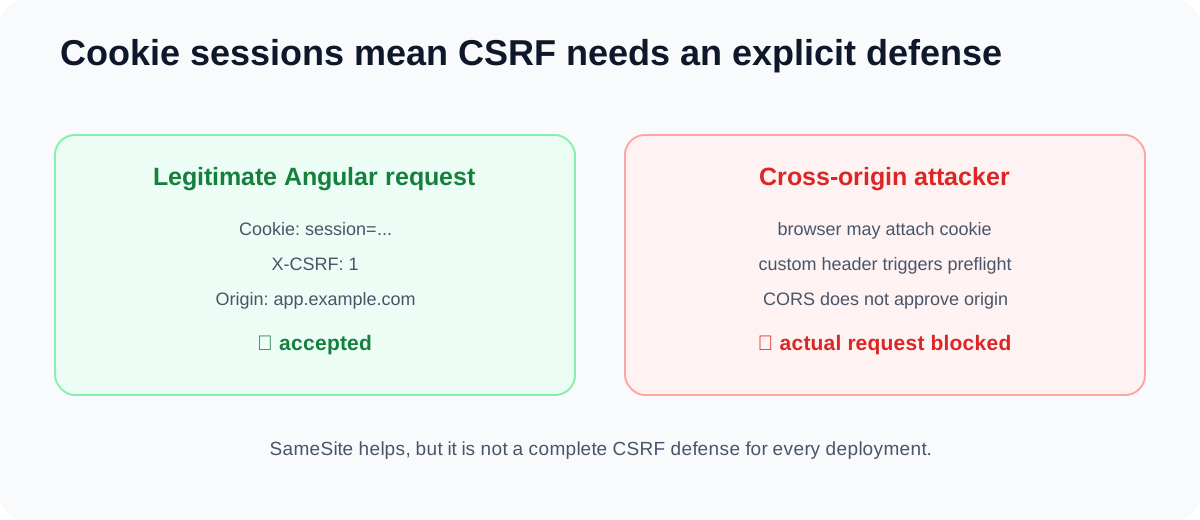
One subtle gotcha is that sibling subdomains are considered the same site even though they are different origins. That means SameSite by itself is not necessarily enough if other applications can exist on sibling subdomains.
One practical defense described by RFC 10017 is to require a custom request header on browser-to-BFF requests and combine that with a restrictive CORS policy. A cross-origin request with a custom header requires a successful preflight, so an unapproved attacker’s origin never gets to send the actual state-changing request with the user’s session.
The sample implements the same idea using an exact Origin check plus a static X-CSRF: 1 header:
function requireCsrf(req: Request, res: Response, next: NextFunction) {
  if (['GET', 'HEAD', 'OPTIONS'].includes(req.method)) return next();

  const origin = req.get('origin');
  if (origin !== publicOrigin || req.get('x-csrf') !== '1') {
    return res.status(403).json({ error: 'CSRF check failed' });
  }
  return next();
}
Framework anti-forgery mechanisms are another valid option. The important thing is that moving from JavaScript bearer tokens to a cookie-backed session changes the threat model, so CSRF needs to be designed explicitly.
Use a mature OIDC client inside the auth gateway
I would not hand-roll the OAuth/OIDC protocol in the auth gateway.
If the gateway is Node.js/TypeScript, openid-client is a good example of a mature library that works inside a server-side auth gateway. It provides discovery, Authorization Code flow, PKCE helpers, refresh-token grants, revocation and related OAuth/OIDC functionality.
The demo auth gateway creates PKCE values and the authorization URL on the server:
const codeVerifier = oidcClient.randomPKCECodeVerifier();
const codeChallenge =
  await oidcClient.calculatePKCECodeChallenge(codeVerifier);

const authorizationUrl = oidcClient.buildAuthorizationUrl(oidc, {
  redirect_uri: redirectUri,
  response_type: 'code',
  code_challenge: codeChallenge,
  code_challenge_method: 'S256',
  state,
  nonce,
});
Then the callback exchanges the authorization code using the server-side verifier:
const tokens = await oidcClient.authorizationCodeGrant(
  oidc,
  currentUrl,
  {
    pkceCodeVerifier: transaction.codeVerifier,
    expectedState: state,
    expectedNonce: transaction.nonce,
    idTokenExpected: true,
  },
);
The library handles protocol mechanics. It does not design the BFF for you. Your gateway still owns the session cookie, CSRF protection, safe post-login redirects, session persistence, route mapping and strict outbound proxy allowlists.
How this works with Angular microfrontends
This is one of the places where an auth gateway can simplify an Angular architecture a lot.
If you have a shell and multiple independently deployed microfrontends, I would not make every MFE its own OAuth client. Otherwise you end up with multiple login flows, redirect configurations, token stores and implementations of the same security-sensitive behavior.
Instead, the browser-facing application uses the auth gateway as the authentication boundary:
/                 -> shell
/orders/*         -> orders MFE
/api/orders/*     -> auth gateway -> orders API
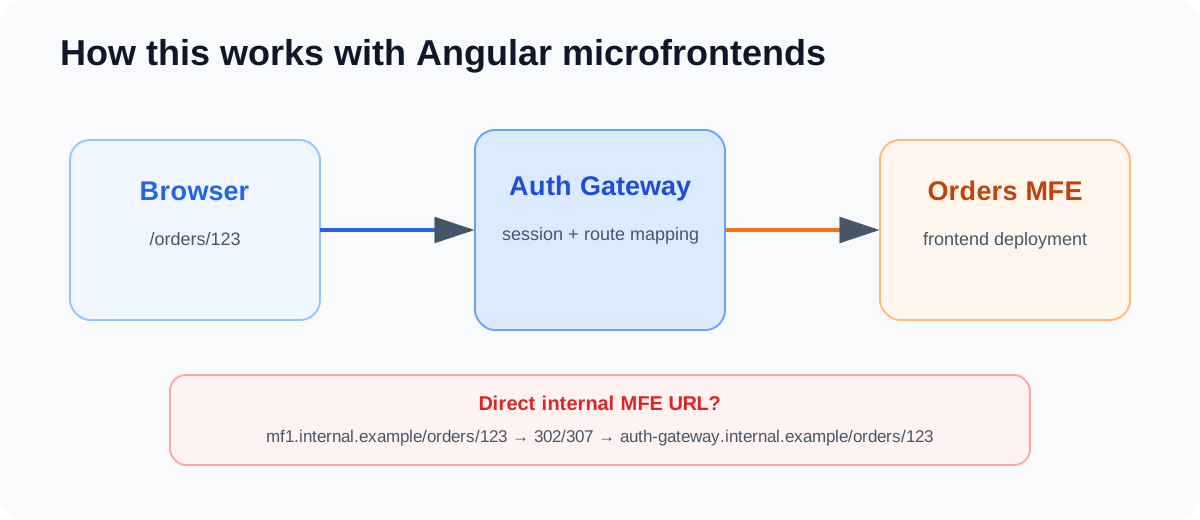
The MFE makes relative protected requests such as /api/orders. In the demo, the gateway authenticates the session, refreshes the server-side token if needed, and injects the bearer token only when proxying to the approved API:
app.use(
  '/api/orders',
  requireApiSession,
  createProxyMiddleware({
    target: ordersApiUrl,
    on: {
      proxyReq(proxyReq, req) {
        const token = (req as BffRequest).bffAccessToken;
        if (token) {
          proxyReq.setHeader('authorization', `Bearer ${token}`);
        }
      },
    },
  }),
);
Gotcha: someone opens the internal MFE address directly
Once you introduce an auth gateway, you can often reach the application through the gateway and also have some direct internal address where a microfrontend is hosted.
The direct MFE address should not silently become a second OAuth client. If a developer opens it in a browser, my preferred behavior is to redirect the document navigation to the corresponding auth-gateway route for that environment:
https://mf1.internal.example/orders/123?tab=history
                    |
                    | 302 / 307
                    v
https://auth-gateway.internal.example/orders/123?tab=history
Preserve the path and query string so deep links still work. I would normally use a temporary redirect while the internal routing model can change.
For the post-login destination, an application-local returnTo is the simplest policy. An absolute return URL can also be valid if the server checks it against a strict allowlist. RFC 9700’s open-redirection guidance requires that clients not expose open redirectors; it does not require every destination to be a relative path.
Also separate document navigation from API behavior. An unauthenticated page navigation can enter the login flow. An unauthenticated fetch/XHR request should normally receive 401, not an HTML login page.
Local development: put the auth gateway in the Nx task graph
I prefer keeping the auth gateway in the same Nx monorepo as the frontend applications. This follows the general approach I describe in The Stages of an Angular Architecture with Nx: keep the architecture close to the code and optimize the developer workflow around it.
For local development, the auth-gateway serve target can be an Nx continuous task. Then an MFE’s serve target can depend on the gateway:
{
  "targets": {
    "serve": {
      "continuous": true
    }
  }
}
{
"targets": {
"serve": {
"dependsOn": [
{ "projects": ["auth-gateway"], "target": "serve" }
]
}
}
}Now nx serve orders-mfe starts the long-running auth-gateway dependency automatically. I like this because the secure architecture becomes part of the normal development workflow instead of something every developer needs to remember to start manually.
Do not accidentally turn the auth gateway into an open proxy
The auth gateway possesses the user’s OAuth access token. If browser input can tell the gateway to forward a request to an arbitrary host, an attacker may be able to trick the gateway into sending that token somewhere it should never go.
RFC 10017 explicitly requires strict outbound request controls and validation of destination hosts.
Good:
/api/orders/* -> approved orders API
/api/users/*  -> approved users API
Bad:
/proxy?url=https://whatever-the-browser-sends.example
The API still owns authorization
The auth gateway does not replace API security.
If the API receives JWT access tokens, it should validate the signature, issuer, audience, expiry and required scopes or roles. If the authorization server uses opaque access tokens, the API should validate them using the mechanism supported by that authorization server, such as token introspection.
The gateway’s job is to get the correct credential to the correct resource server without exposing that credential to browser JavaScript. The resource server still decides whether that credential is allowed to perform the requested operation.
Sessions, replicas and refresh tokens
The auth gateway becomes part of the critical path, so I would normally run more than one instance in production.
In the demo I use Redis for the browser sessions and short-lived OAuth login transaction state. With shared state, any gateway replica can handle the next request or the OAuth callback, so you do not need to depend on sticky sessions.
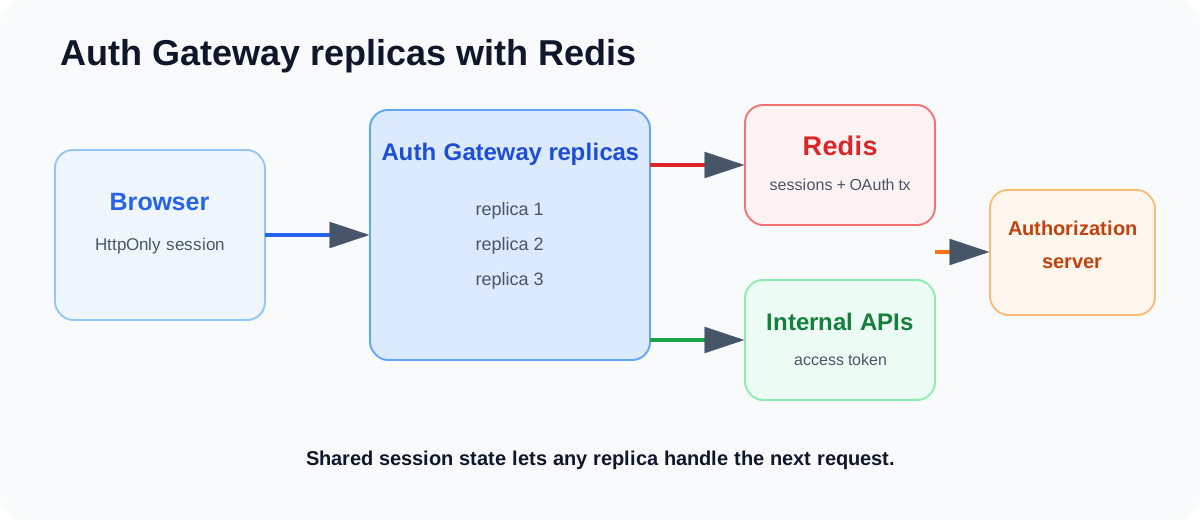
The session configuration in the sample is deliberately server-side:
const redis = createClient({ url: process.env.REDIS_URL });
await redis.connect();

app.use(
  session({
    store: new RedisStore({ client: redis, prefix: 'session:' }),
    resave: false,
    saveUninitialized: false,
    cookie: {
      httpOnly: true,
      secure: isProduction,
      sameSite: isProduction ? 'strict' : 'lax',
      path: '/',
    },
  }),
);
Token refresh also needs a little care. Several parallel frontend requests can arrive just as an access token expires. Without coordination, multiple gateway requests or replicas may all try to refresh the same session at once. In production I would add a small per-session refresh lock in Redis so only one request refreshes a token at a time and the others reuse the updated session.
This is also a good example of separation of responsibility: token lifecycle and session coordination are server concerns, not Angular concerns.
The GitHub demo
I added this architecture as Solution 7 – Modern Angular Auth Gateway (Nx) in the same repository as the original OpenID Connect series.
The demo contains an Angular shell, an orders microfrontend, an auth gateway, a protected API, Redis-backed sessions and a local OpenID Connect development setup. The specific identity-provider technology is deliberately not the point. The interesting part is the boundary:
The sample also covers direct MFE deep links, server-side token refresh, CSRF/origin checks, fixed upstream routing and the Nx continuous-task setup for local development.
Conclusion
In this post we went through the timeline from server-side sessions, through OAuth 1.0 and the original OAuth 2.0 browser flows, to PKCE and finally the modern BFF/auth-gateway model.
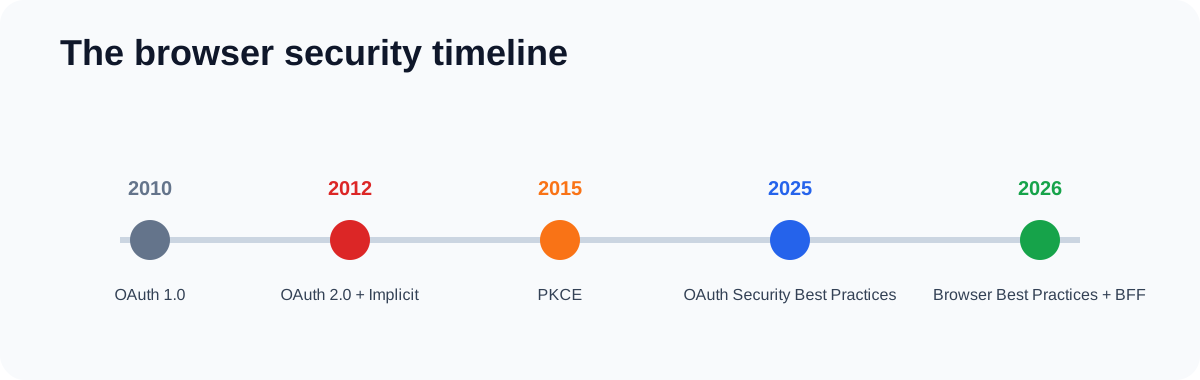
You can jump back to the individual parts here:
- Before OAuth 2.0: server-side sessions
- 2010: OAuth 1.0 and signed requests
- 2012: OAuth 2.0 overview
- 2012: OAuth 2.0 and the implicit-flow era
- 2015: PKCE protects the authorization code
- What PKCE does not solve
- 2025-2026: the security boundary moves to the server
- How this works with Angular microfrontends
- Sessions, replicas and refresh tokens
My recommendation today
Architecturally, I think BFFs and auth gateways are the right direction for most modern business Angular applications where running a small server-side component is realistic.
The biggest reason is separation of responsibility. Angular is responsible for UI and user interaction. The auth gateway owns the browser session and OAuth/OIDC protocol. The API owns authorization and business rules. Each security-sensitive responsibility sits in the layer that is best equipped to handle it.
The security benefit follows naturally from that separation: access and refresh tokens no longer need to exist in browser JavaScript. The same architecture also gives you a good place to handle API aggregation, caching, session coordination and other BFF concerns. That can improve frontend performance by reducing browser round trips and moving service-to-service work onto the server-side network, although the gateway itself does add an extra hop.
For a simple SPA where introducing a backend component is not worth the operational cost, a browser OAuth client using Authorization Code + PKCE is still a valid architecture. RFC 10017 documents that pattern too. It simply comes with the explicit trade-off that OAuth tokens are accessible to the browser application.
So I do not see this evolution as “the old approach was wrong”. Each step responded to the browser platform and threat model of its time.
The question has gradually moved from:
How do I get an OAuth token safely into Angular?
to:
Does Angular need the OAuth token at all?
For most enterprise Angular applications I work with today, my answer would be no.
Expose sessions to browsers. Expose OAuth tokens to servers.
Resources
- RFC 5849 – The OAuth 1.0 Protocol
- RFC 6265 – HTTP State Management Mechanism
- RFC 6749 – The OAuth 2.0 Authorization Framework
- RFC 7636 – Proof Key for Code Exchange by OAuth Public Clients
- RFC 8252 – OAuth 2.0 for Native Apps
- RFC 9700 – Best Current Practice for OAuth 2.0 Security
- RFC 10017 – OAuth 2.0 for Browser-Based Applications
- 2018 OAuth 2.0 for Browser-Based Apps Internet-Draft
- My Angular and OpenID Connect series
- Implicit Flow vs. Code Flow with PKCE
- The Complete Guide to Angular Security
- The Complete Guide to BFF
- The Stages of an Angular Architecture with Nx
- openid-client
- Solution 7 – Modern Angular Auth Gateway (Nx)


